
This article follows on from the previous one on AKO with Cert-Manager and External DNS. In which we built a single-region VKS Kubernetes environment with AVI DNS service and enterprise-ready CNAME aliasing. This is a foundation for multi-region global server load balancing.
In this article, I’ll show a practical pattern for combining GitOps with regionally redundant Global Load Balancing (GSLB) and localised CNAME aliasing. The moment we introduce global traffic, we’re no longer just deploying apps; we are designing a globally distributed system.
To achieve this, we will deploy:
- A single VKS management cluster running the following platform components:
- Argo CD
- External DNS
- Certificate Manager
- Multiple VKS clusters with their own:
- External DNS
- Certificate Manager
- Sealed Secrets
- AKO instance
- Avi Multi-Cluster Kubernetes Operator (AMKO)
- An NGINX-based front-end application stretched across two regions
My VMware VCF 9.0.2 lab only consists of a single host in a management domain and no workload domains. For the second VKS region, we are limited in options. It’s only supported to have a 1-1 relationship between NSX Manager and the AVI control plane, so we can’t fully register the additional AVI plane with my existing NSX using an enforcement point. Instead, we will manually configure AVI and integrate it using AVI IPAM on NSX-backed segments.
Note from a VMware point of view, this design is not recommended for production; the layer 4 Kubernetes API services for region 02 will attach to the region 01 AVI service engines, blurring the lines between fault domains. However, given the constraints of such a small lab, we can still demo a multi-regional VKS build and fully attach services to GSLB using AKO and AMKO.
In the real world, you would have multiple workload domains with full separation. This is because GSLB sites are best designed as autonomous systems with their own fault domains, networking, power, etc.
For easy repeatability, where possible, we will use scripting, Helm, and ArgoCD, specifically the ApplicationSet pattern. I’m using a monorepo for ArgoCD here.
I’ve chosen not to use the Broadcom ArgoCD Supervisor service, mainly as it’s downstream and was last updated in December 2025; in my experience, the lag from upstream is typical for supervisor services and can be restrictive. Instead, we will deploy upstream ArgoCD into a dedicated VKS management cluster.
Navigation
- Target Topology
- Control Planes
- VKS Regional Deployments
- VKS Regional AMKO Prerequisites
- VKS Management Cluster
- Regional VKS Cluster Bootstrap
- Application Deployment
- Change the Leader
- Make the prior leader a follower
- Final Topology
- Conclusion
Target Topology
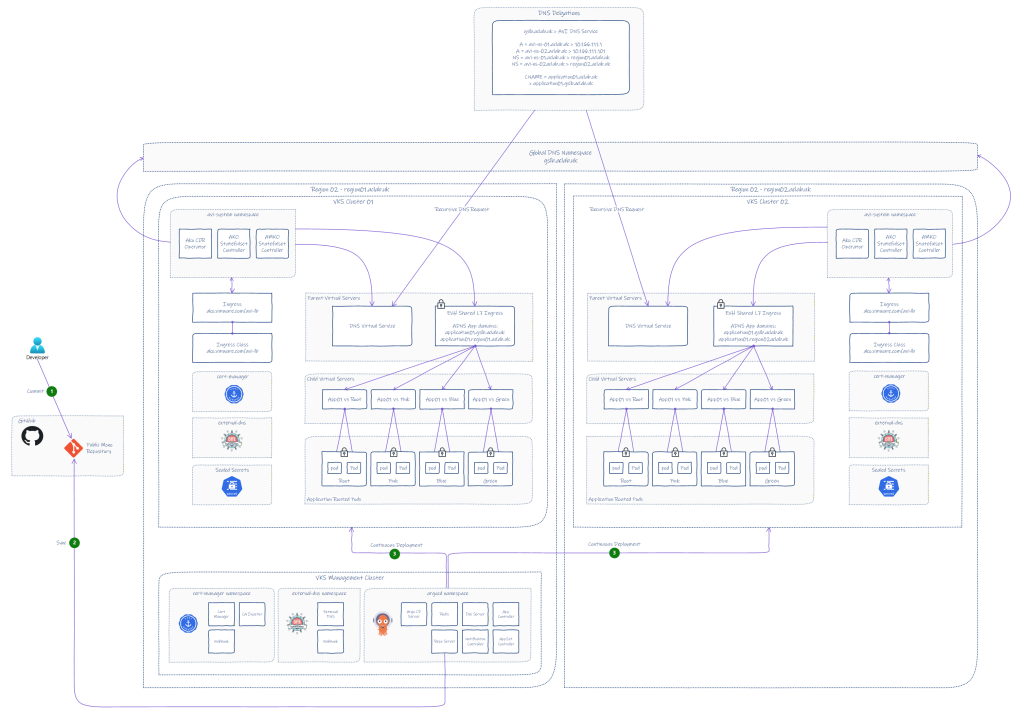
In line with the last AKO article, we will start with the target topology, which we can refer back to throughout the deployment to help understand how everything fits together.
Note: the latest 2.1.1 version of AMKO will only support Ingress, Route (OpenShift), or services of type LoadBalancer. This immediately disqualifies Gateway API; hence, this article will focus exclusively on Ingress.
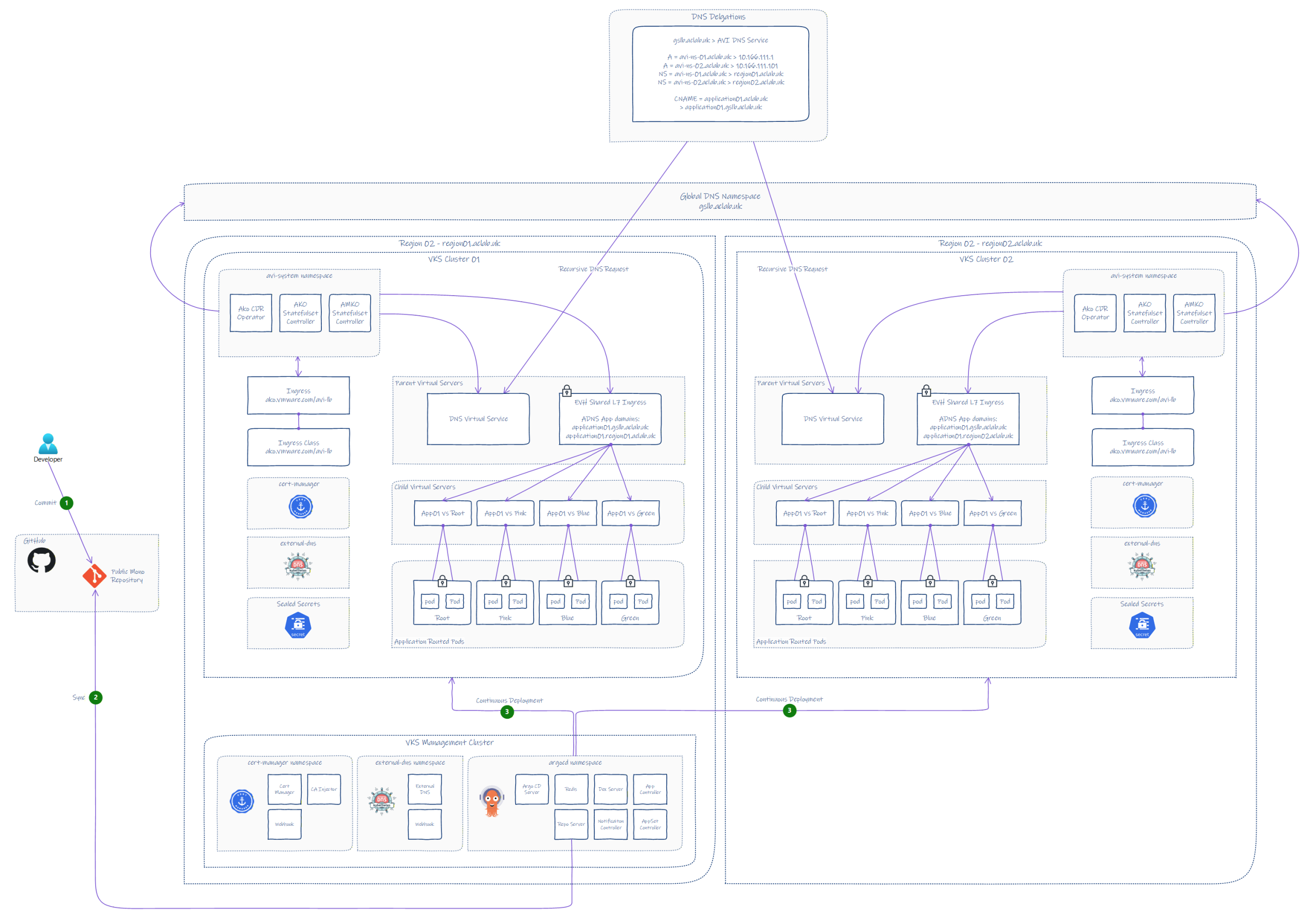
PDF format is also available here.
Control Planes
We have three broad control plane categories in the design. Due to limited hardware in my lab, we are sharing a common supervisor. In a production environment, the regions would be best placed in separate workload domains for loose coupling and clearly distinguished fault domains.
- Deployment – Centralised ArgoCD instance, with desired state in GitHub.
- Traffic – AVI control plane per region to strengthen resilience.
- Kubernetes Cluster control planes, in total, there are 4 Kubernetes clusters.
- vSphere Supervisor
- VKS Management Control Plane
- VKS Region 01 Control Plane
- VKS Region 02 Control Plane
VKS Regional Deployments
At the time of writing, we can use v1.35.2+vmware.1-vkr.3.
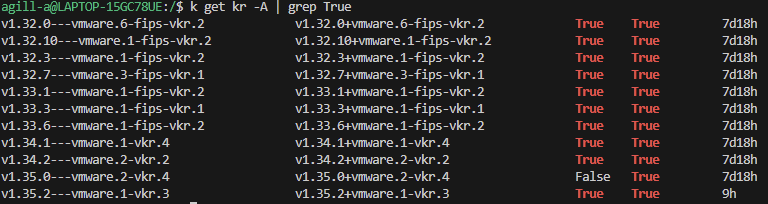
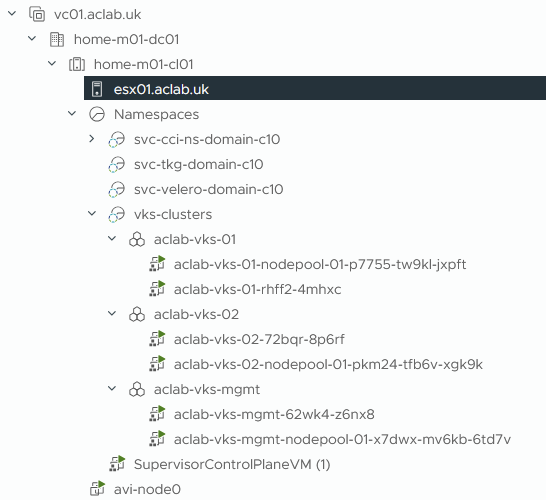
I’ve crafted three new VKS cluster YAML files, which I will place inside a common vks-clusters supervisor namespace. The three clusters are:
| VKS Cluster Name | Labels | Use Case |
| aclab-vks-mgmt | org: aclab env: lab region: region01 | Used for ArgoCD to bootstrap all other VKS clusters |
| aclab-vks-01 | org: aclab env: lab region: region01 | VKS Cluster in region 01 |
| aclab-vks-02 | org: aclab env: lab region: region02 | VKS Cluster in region 02 |
If this were a production environment, then we would likely be talking about deploying to different supervisors on geographically separated vSphere compute clusters. We will now deploy all three VKS clusters to the supervisor; the YAML files are here.
## deploy all vks clusters
k apply -f .
After a wee while, we have our clusters up and operational.
We can then create the kubeconfig contexts for each.
## create new contexts for each of the vks clusters
vcf context create aclab-vks-mgmt --endpoint sup01.aclab.uk --username administrator@vsphere.local --insecure-skip-tls-verify --workload-cluster-name aclab-vks-mgmt --workload-cluster-namespace vks-clusters

vcf context create aclab-vks-01 --endpoint sup01.aclab.uk --username administrator@vsphere.local --insecure-skip-tls-verify --workload-cluster-name aclab-vks-01 --workload-cluster-namespace vks-clusters

vcf context create aclab-vks-02 --endpoint sup01.aclab.uk --username administrator@vsphere.local --insecure-skip-tls-verify --workload-cluster-name aclab-vks-02 --workload-cluster-namespace vks-clusters
Then confirm the node labels for each; only the worker nodes are listed as the labels in the VKS YAML do not currently apply to the control plane nodes.
## validate the labels from inside each vks cluster
vcf context use aclab-vks-mgmt:aclab-vks-mgmt
k get nodes -l region=region01

vcf context use aclab-vks-01:aclab-vks-01
k get nodes -l region=region01

vcf context use aclab-vks-02:aclab-vks-02
k get nodes -l region=region02


VKS Regional AMKO Prerequisites
Region 01 AVI Control Plane
Region 01 has already got AVI as part of the VCF deployment into the management domain. For details on the setup, please refer to this article.
The local delegation for this region is region01.aclab.uk. Therefore, the SOA domain record was added to the AVI under the default System-DNS application profile.
The controller itself in region01 remained with the prior name of “avi.aclab.uk” – whenever the stack gets redeployed, I will probably use a different name that better references the region.

Updating the System-DNS application profile allows a successful SOA query when configuring the DNS delegation for region01.aclab.uk.
The AVI DNS profile is configured with the local region and the main domain.
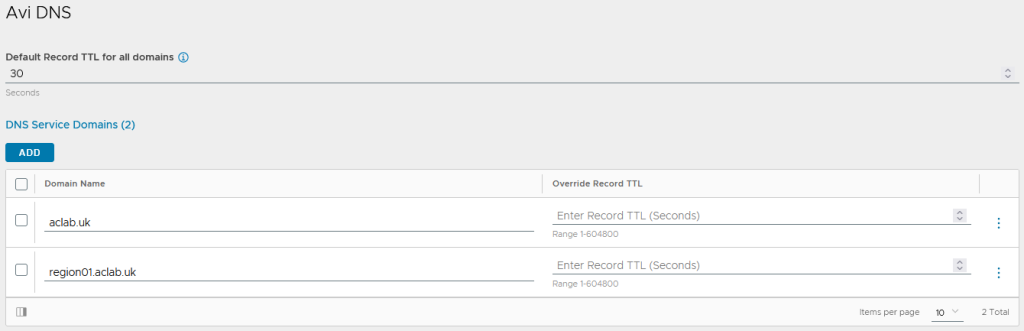
Region 02 AVI Control Plane
To get regional autonomy, we need to deploy a second AVI control plane in region 02. This will host a second AVI DNS service and load-balancing virtual servers for ingress objects. We will deploy a single AVI node using the OVF tool that can be downloaded from the Broadcom developer website here.
## install tool
sudo dnf install libnsl* -y
unzip VMware-ovftool-5.0.0-24781994-lin.x86_64.zip
sudo mv ovftool /opt
ln -s /opt/ovftool/ovftool /usr/local/bin/ovftool

## pass login creds for vcenter as vars
username=administrator@vsphere.local
read -sp "Enter your password: " password

## deploy avi control plane for region 02
ovftool --name=avi-node0r2 --datastore=local-esx01-backup \
--allowExtraConfig --acceptAllEulas --noSSLVerify --skipManifestCheck \
--network=dp-vm-mgmt-v101 -ds=local-esx01-backup --powerOn -dm=thin --vmFolder=VCF \
--prop:avi.mgmt-ip-v4-enable.CONTROLLER="True" \
--prop:avi.mgmt-ip.CONTROLLER="10.166.101.32" \
--prop:avi.mgmt-mask.CONTROLLER="255.255.255.0" \
--prop:avi.default-gw.CONTROLLER="10.166.101.254" \
--prop:avi.mgmt-ip-v6-enable.CONTROLLER="False" \
--prop:avi.hostname.CONTROLLER="avi-node0r2.aclab.uk" \
controller-31.1.2-9193.ova vi://$username:$password@vc01.aclab.uk/home-m01-dc01/host/home-m01-cl01
For the AVI configuration, the setup is almost the same as the first region. The modifications are listed below.
The controller in region02 uses a different SAN certificate with a unique name.
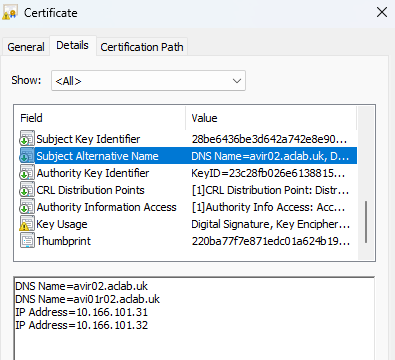
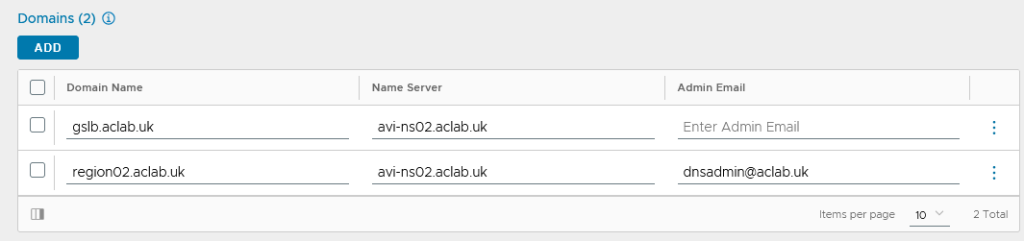
The local delegation for this region is region02.aclab.uk. Therefore, the SOA domain record was added to the AVI under the default System-DNS application profile.
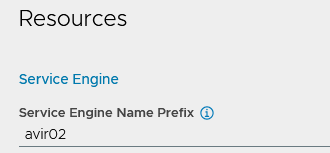
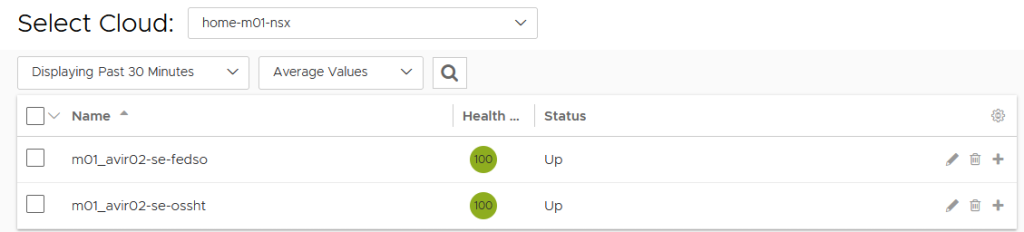
We have integrated region 02 directly into traditional NSX segments rather than integrating via VPC, like in the first region. Service engines have a unique name prefix, so they are easy to spot in vCenter.
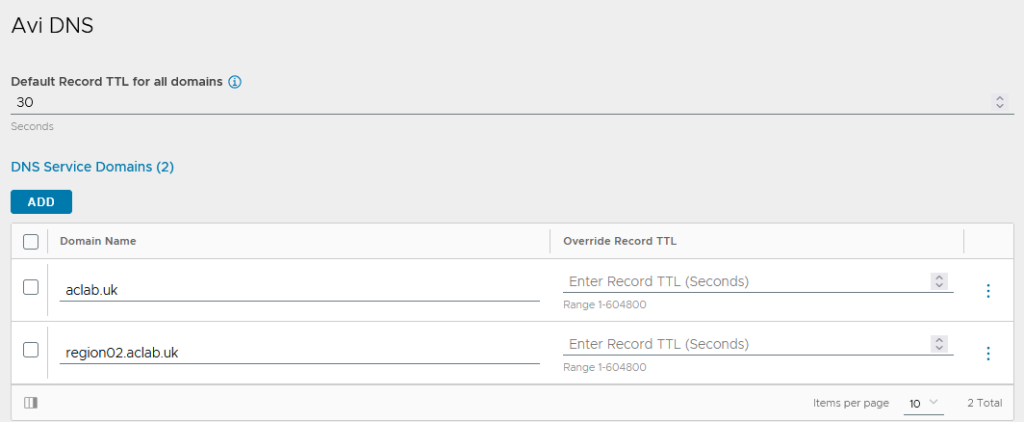
The AVI DNS profile is configured with the local region and the main domain.
AVI controller GSLB
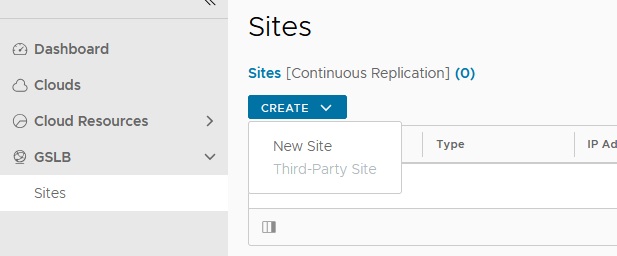
We need to configure the AVI control plane for GSLB. This allows us to delegate “gslb.aclab.uk” across multiple geographies. The setup for this is remarkably simple. From the region 01 AVI, go to infrastructure > GSLB > click create > new site.
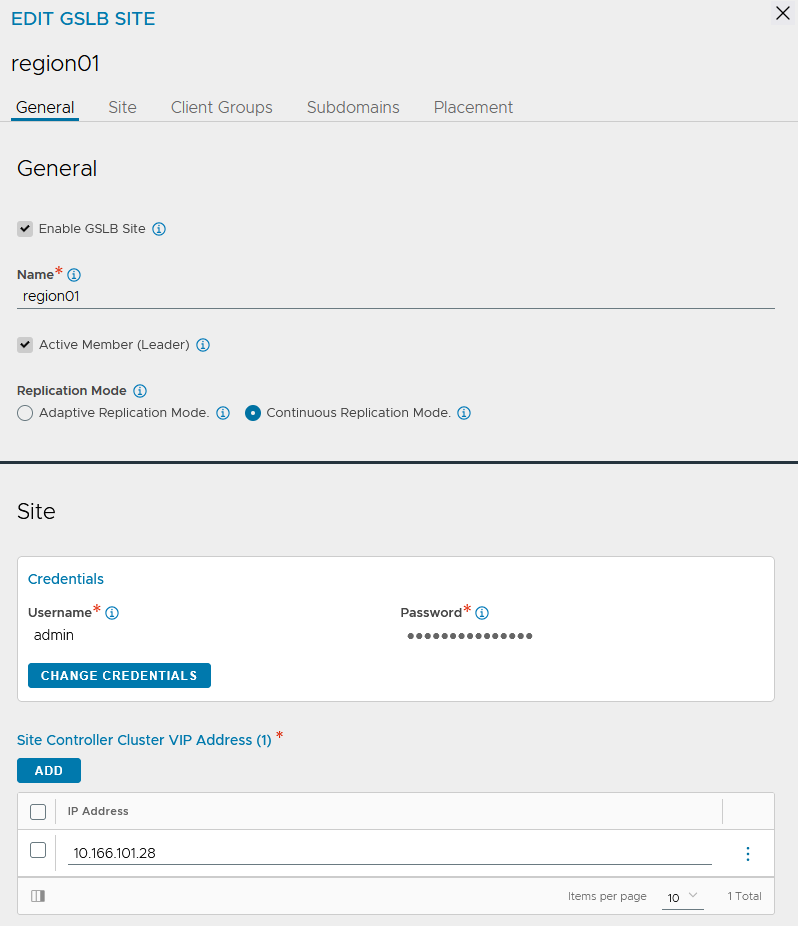
Enter region01 as the name, click change credentials and enter the username and password of the AVI controller. The IP will be filled in automatically.
Under subdomains, enter the delegated domain we want to use. In this design, we will be using gslb.aclab.uk”.
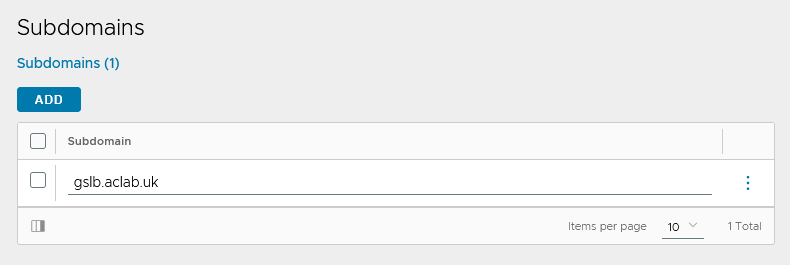
Under placement, add the DNS virtual service. Click save and save again.
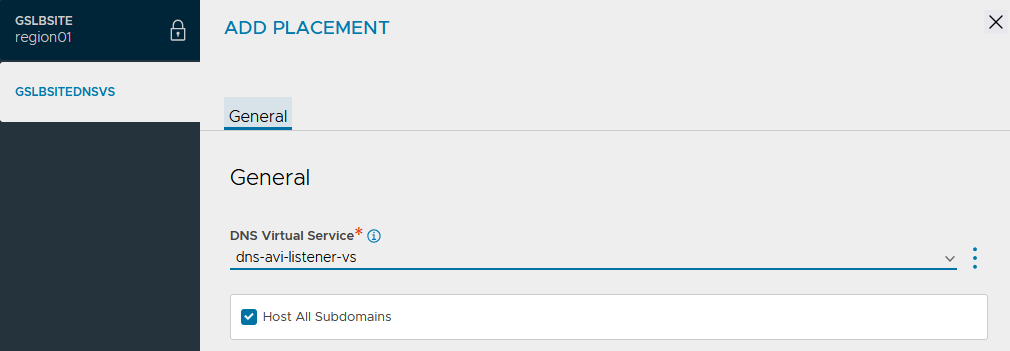
We now have our primary site configured. Click Create> New Site again.
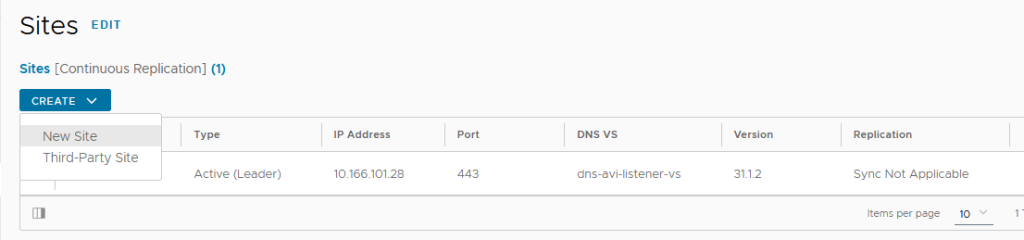
This time around, enter region02 as the name and tick the active member (follower box).
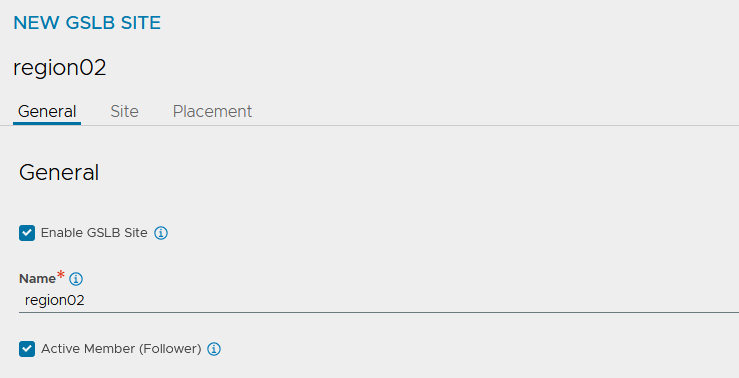
We will configure both sites as active; only one will be the leader, and the other will remain a follower. Pairing sites will enable replication of the configuration between all regional AVI control planes.
The leader performs the following core functions.
| Function | Responsiblity |
| Definition and ongoing synchronisation and maintenance of the GSLB configuration. | Avi Load Balancer Controller. |
| Optimising application service for clients by providing GSLB DNS responses to their FQDN requests based on the GSLB algorithm configured | Avi Load Balancer Controllers and Service Engines (SEs). |
| Optimising application service for clients by providing GSLB DNS responses to their FQDN requests based on the GSLB algorithm configured | Avi Load Balancer GSLB DNS running in one or more service engines. |
| Processing of application requests | Services placed on Avi Load Balancer service engines. |
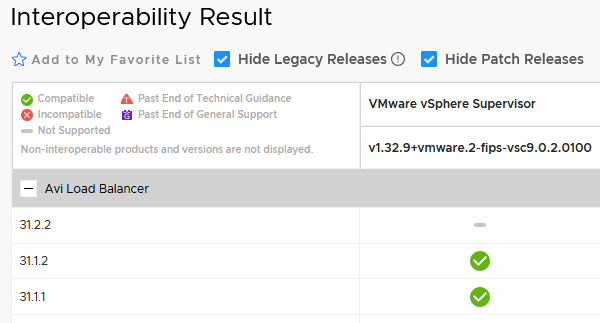
You may be wondering what happens if the leader fails? With two sites, the failover is manual as documented here. If three sites are present and AVI version 31.2.1 or later is in use, automatic failover is possible as documented here.
Our current environment runs 31.1.2, so we would need to upgrade and could then introduce the management cluster into the mix. This is something I will cover in a separate article once interoperability is verified by Broadcom.
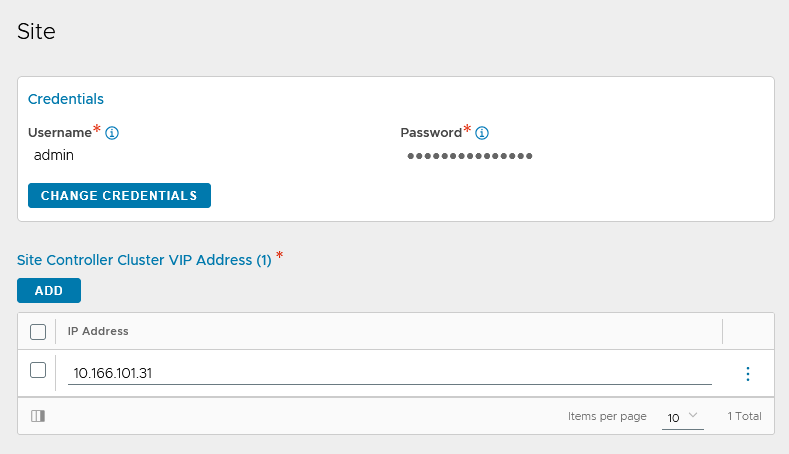
Click change credentials, enter the username and password of the second AVI controller and also add the VIP address. Click save.
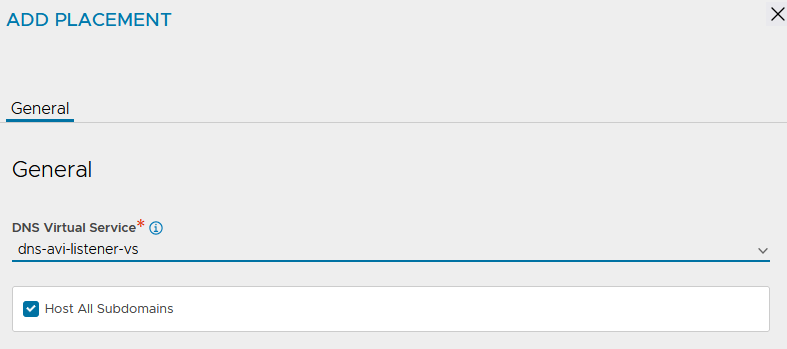
Edit the region 02 site and change the placement to the discovered DNS service. Click save.
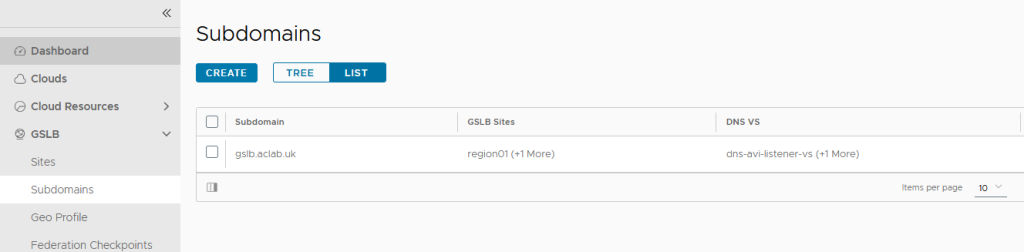
At this point, we will have both sites configured.

As well as a single subdomain across both regions.
If we log in via the region 02 AVI control plane, we can only see sites and cannot edit them. This is because the second region is currently a “follower” and does not own the configuration.

DNS Delegations
Our MikroTik router has a broad DNS delegation that covers *.*.aclab.uk, which includes gslb.aclab.uk, region01.aclab.uk and region02.aclab.uk. I do this as I don’t want my home network to depend on the Active Directory VM inside VCF.
I could have also set up forwarders directly to the AVI DNS virtual servers, but I have chosen to stick with doing it via Microsoft Active Directory, as it’s more common.
## mikrotik dns confiuration
/ip dns forwarders
add dns-servers=10.166.108.10 name=dc01 verify-doh-cert=no
/ip dns static
add comment="Active Directory Delgation" forward-to=dc01 match-subdomain=yes name=aclab.uk type=FWD
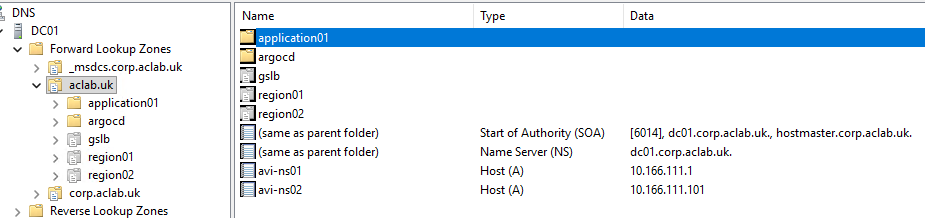
From Active Directory, we have the following DNS records.
| Record Type | Host | Value | Deployed Where? | Use Case |
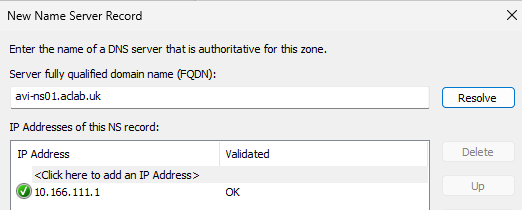
| A | avi-ns01.aclab.uk | 10.166.111.1 | Microsoft AD DNS | Points to the AVI ADNS VS DNS service in region 01. |
| A | avi-ns02.aclab.uk | 10.166.111.101 | Microsoft AD DNS | Points to the AVI ADNS VS DNS service in region 02. |
| NS | region01.aclab.uk | avi-ns01.aclab.uk. | Microsoft AD DNS | The delegation record for region 01 |
| NS | region02.aclab.uk | avi-ns02.aclab.uk. | Microsoft AD DNS | The delegation record for region 02 |
| NS | External DNS auto-created a record for the application via GSLB in all regions | avi-ns01.aclab.uk. avi-ns02.aclab.uk. | Microsoft AD DNS | The delegation record for all regions |
| A | argocd.aclab.uk | 10.166.108.52 | Microsoft AD DNS | External DNS auto-created record for ArgoCD in the management cluster. |
| CNAME | application01.aclab.uk | application01.gslb.aclab.uk. | Microsoft AD DNS | External DNS auto-created record for the application via GSLB in all regions |
From the Microsoft DNS console, this is how it looks.
Multi-cluster Kubeconfig
We need to create a static authentication method for the AMKO controller, so it can connect to all of our regional clusters. If we use the existing VFC credentials in our own kubeconfigs, the short-lived authentication token will eventually expire, breaking AMKO. Instead, we will craft service account token
The following needs to be created in each regional VKS cluster. Initially, there is no ClusterRole or ClusterRoleBinding; these will be deployed later as part of ArgoCD.
## switch to the vks cluster
vcf context use aclab-vks-01:aclab-vks-01

## create a service account, secret and cluster role for amko
k apply -f avi/amko

## craft a kubeconfig file for regional vks cluster 01
region01clustername=aclab-vks-01
region01server=https://10.166.108.51:6443
region01ca=$(kubectl get secret avi-amko-token -n avi-system -o jsonpath='{.data.ca\.crt}')
region01token=$(kubectl get secret avi-amko-token -n avi-system -o jsonpath='{.data.token}' | base64 --decode)
region01sa_name=$(kubectl get sa avi-amko-sa -n avi-system -o jsonpath='{.metadata.name}')
ns=avi-system

## switch to the vks cluster
vcf context use aclab-vks-02:aclab-vks-02

## create a service account, secret and cluster role for amko
k apply -f avi/amko

# create vars from vks-cluster-02
region02clustername=aclab-vks-02
region02server=https://10.166.108.25:6443
region02ca=$(kubectl get secret avi-amko-token -n avi-system -o jsonpath='{.data.ca\.crt}')
region02token=$(kubectl get secret avi-amko-token -n avi-system -o jsonpath='{.data.token}' | base64 --decode)
region02sa_name=$(kubectl get sa avi-amko-sa -n avi-system -o jsonpath='{.metadata.name}')

## craft a kubeconfig file for use with amko NOT synced into github
cat <<EOF > ../kubeconfig/gslb-members
apiVersion: v1
kind: Config
clusters:
  - name: ${region01clustername}
    cluster:
      certificate-authority-data: ${region01ca}
      server: ${region01server}
  - name: ${region02clustername}
    cluster:
      certificate-authority-data: ${region02ca}
      server: ${region02server}
contexts:
  - name: ${region01sa_name}@${region01clustername}
    context:
      cluster: ${region01clustername}
      namespace: ${ns}
      user: $region01clustername-${region01sa_name}
  - name: ${region02sa_name}@${region02clustername}
    context:
      cluster: ${region02clustername}
      namespace: ${ns}
      user: $region02clustername-${region02sa_name}
users:
  - name: $region01clustername-${region01sa_name}
    user:
      token: ${region01token}
  - name: $region02clustername-${region02sa_name}
    user:
      token: ${region02token}
current-context: ${region01sa_name}@${region01clustername}
EOF

## confirm the config file
k config get-contexts --kubeconfig ../kubeconfig/gslb-members
k config get-clusters --kubeconfig ../kubeconfig/gslb-members
k config get-users --kubeconfig ../kubeconfig/gslb-members
We will then create the base64 encoded secret file. We are storing this outside the GitHub repository so we don’t expose sensitive information. Later, we will convert this to a Sealed Secret.
## create secret file
kubectl create secret generic gslb-config-secret --dry-run=client --from-file ../kubeconfig/gslb-members -n avi-system -o yaml > ../sealed-secrets/avi/amko-secret.yaml
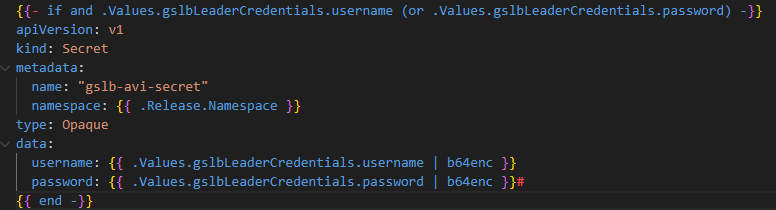
Unfortunately, version 2.1.1 of the Broadcom AMKO Helm chart has no logic within the secret template file to use an existing secret. Without this, you’re forced to put the credentials in the values file, which is not secure for our Argo Deployment. As such, the chart was pulled, packaged and pushed into my own Docker container registry for use on the regional VKS clusters.
Below is the logic statement added to ensure the secret is ignored when the credentials are excluded from the values file.
VKS Regional Cluster Secrets
At this point, we have hit a chicken-egg problem. Secrets are only encoded in Base64 and are not considered secure. We will use Sealed Secrets to improve security and allow us to store the configuration in GitHub for automation. However, we can’t create Sealed Secrets until the controller is up inside each VKS cluster. We must therefore run some manual commands.
Secrets are deployed for:
- AVI AKO control plane authentication
- AVI AMKO control plane authentication
- Certificate Manager ClusterIssuer
- External DNS kerberos service account password
For Sealed Secrets to take ownership of existing secrets, the following annotation is added to each of the secret YAML files.

Below are all of the secrets that we will create, which will later be owned by Sealed Secrets.
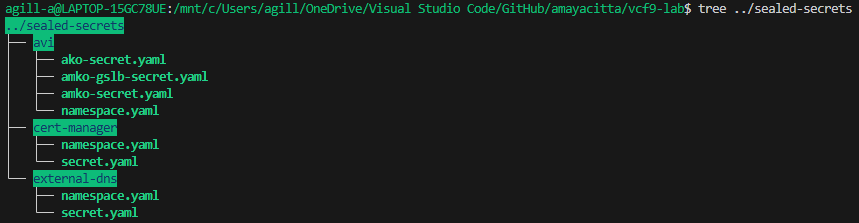
## login to each vks regional cluster and deploy secrets from yaml files NOT within github
vcf context use aclab-vks-01:aclab-vks-01
kubectl apply -R -f ../sealed-secrets
vcf context use aclab-vks-02:aclab-vks-02
kubectl apply -R -f ../sealed-secrets
VKS Regional CoreDNS Configuration
In testing, I found the VKS cluster nodes were unable to reach my external MikroTik DNS server. CoreDNS uses /etc/resolv.conf on the VKS nodes, meaning it follows the default host resolver configuration, which should be the workload DNS server address of 10.166.101.254.
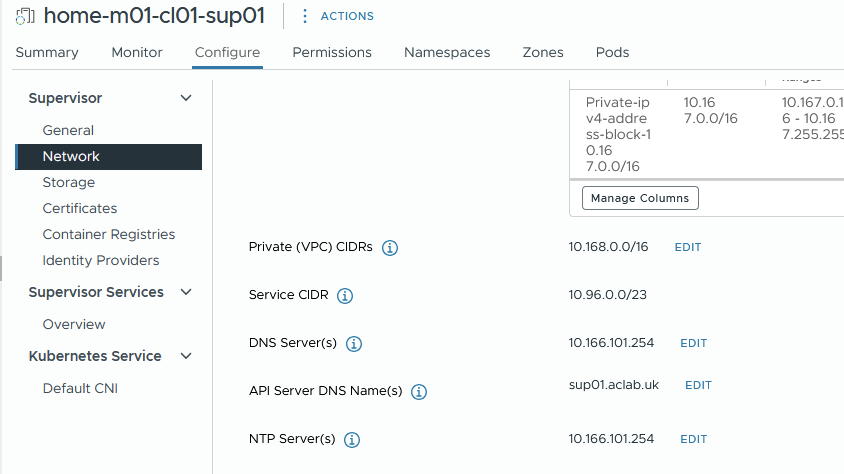
I will debug this at some point, but for now, I simply changed CoreDNS to go directly to the 10.166.101.254 address. This is simple, easy, and worked immediately.
## edit the coredns config map on each regional VKS cluster and reboot the service
k edit configmap -n kube-system coredns
k rollout restart -n kube-system deploy/coredns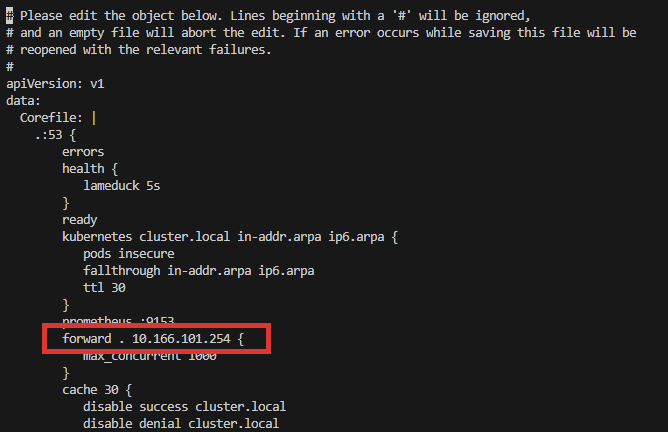
VKS Management Cluster
Next, we need to bootstrap the management cluster. At this point, we find ourselves with another chicken-and-egg problem. If we only deploy the vks-mgmt-bootstrap Helm chart, we won’t have the CRDs for Cert Manager, and the Certificates will fail. Also, there is no namespace override flag in the External DNS chart, so if we deployed External DNS as a dependent subchart of the bootstrap parent chart, we would end up with External DNS in the “bootstrap” namespace.
Neither of these is ideal. Therefore, we will run some minimal commands before we deploy the bootstrap Helm chart. These can be easily wrapped into a bash script for better automation.
## switch to management vks cluster
vcf context use aclab-vks-mgmt:aclab-vks-mgmt

## deploy cert manager with crds
helm install cert-manager oci://quay.io/jetstack/charts/cert-manager --version v1.20.1 --namespace cert-manager --create-namespace --set crds.enabled=true

## deploy external-dns which will use the pre-existing kerberos secret
helm repo add external-dns https://kubernetes-sigs.github.io/external-dns/
helm upgrade --install external-dns external-dns/external-dns --namespace external-dns --version 1.20.0 --values dev-values-mgmt.yaml
With the above in place, we can now deploy the vks-mgmt-bootstrap Helm chart. This will deploy:
- A secret with the VKS subordinate issuing certificate and the related ClusterIssuer. The secret will be deployed using –set commands in Helm so we can do it securely and not store sensitive information in GitHub.
- ArgoCD plumbed into Cert Manager and External DNS using a LoadBalancer service.
- ArgoCD application sets for each regional VKS cluster. These are controlled with ArgoCD cluster labels and Helm values file.
- A certificate trust bundle config map for ArgoCD, which includes our offline root and both subordinate public certificates.
I’ve pre-configured the default values file for the lab. Note the use of $publickey and $privatekey for the Helm “–set” commands. This allows us to deploy without exposing the private key in GitHub.
## place the public and private certificateissuer variables in the current bash session
publickey=$(cat tanzu-sub01-public.cer | base64 -w0)
privatekey=$(cat tanzu-sub01-private.pem | base64 -w0)

## deploy our helm vks bootstrap chart
k create ns argocd
helm upgrade --install vks-bootstrap . -n bootstrap --create-namespace --version 0.1.0 --set certmanager.ClusterIssuer.publickey=$publickey,certmanager.ClusterIssuer.privatekey=$privatekey
Because we have Cert-Manager and ExternalDNS configured, an A record is automatically created and resolves to the external address of the ArgoCD service. This method is simple and preferred as the management cluster only has Argo inside; we could deploy AKO, but it’s probably over-engineered.
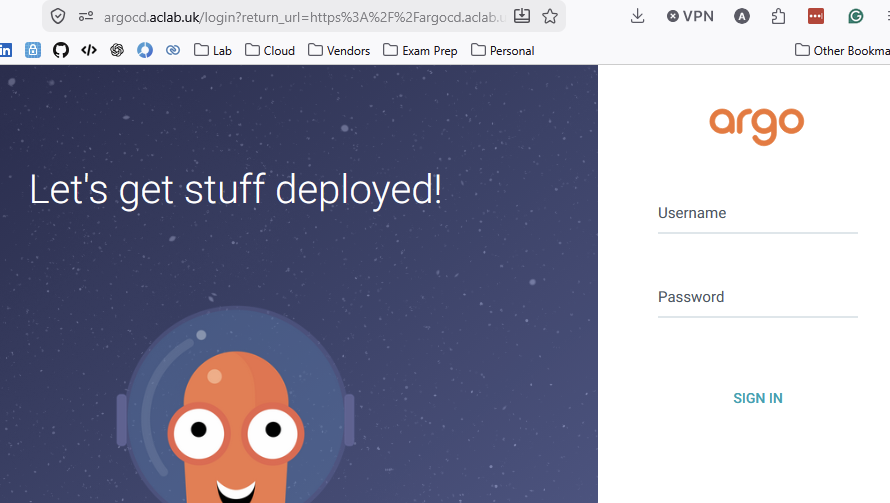
I can hit the application URL without a certificate warning. The default password is stored with a bcrypt hash inside the values file; we can use this to log in with the default admin user. The comments in the values file show you how to generate the hash for your own password.
We can now install the ArgoCD CLI; the binary will pull directly from our local instance. Once installed, we can log in.
## install cli
sudo curl https://argocd.aclab.uk/download/argocd-linux-amd64 -o /usr/local/bin/argocd
sudo chmod +x /usr/local/bin/argocd

## login
argocd login argocd.aclab.uk --username admin
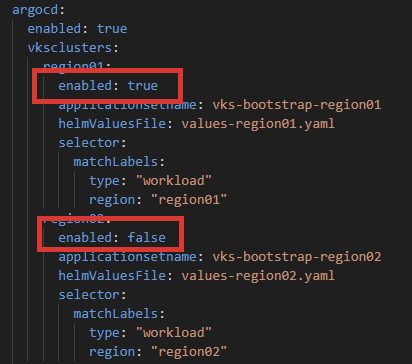
Using the Argo CLI, we can easily add both VKS clusters. We will override the kubeconfig context name for the VKS cluster using the “–name” flag. Configured labels will be used to attach to the Application Sets deployed by the vks-bootstrap Helm chart.
If you don’t want everything to deploy, either emit these labels or set the Helm values “argocd.vksclusters.regionXX.enabled” flag to false.
## add clusters and list them
argocd cluster add aclab-vks-01:aclab-vks-01 --label region=region01 --label type=workload --name aclab-vks-01 -y
argocd cluster add aclab-vks-02:aclab-vks-02 --label region=region02 --label type=workload --name aclab-vks-02 -y
argocd cluster list
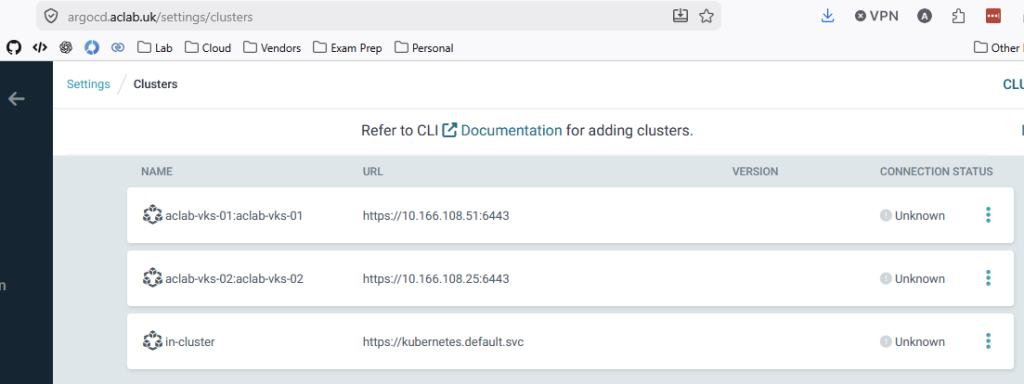
The clusters will also show up in the Argo GUI as “unknown” until something is deployed.
Regional VKS Cluster Bootstrap
If we added the ArgoCD cluster labels when adding them into Argo, the bootstrap process would have already begun. If you didn’t apply them, do so now using the command below.
argocd cluster set aclab-vks-01 --label type=workload --label region=region01
argocd cluster set aclab-vks-01 --label type=workload --label region=region01
The application sets have been split into two categories.
- Bootstrap for platform-related components such as AKO, AMKO, Certificate Manager, ExternalDNS and Sealed Secrets.
- Applications, which in this case is my NGINX test application, which you can review here and here.

The platform application sets watch subfolders in this path in GitHub. Within the folder we have added:
- Sealed Secrets
- Certificate Manager
- External DNS
- AVI Kubernetes Operator
- AVI Multi-Cluster Kubernetes Operator – pulled and customised to use controller creds from a secret, not Helm values. See the custom manifests here.
The application sets for the front-end applications watch subfolders in this path in GitHub.
Each of these folders is a Helm chart with a dependent subchart. By way of example, if you open the Chart.yaml for AKO, you can see how it’s done. We will be deploying the OCI-based AVI AKO version 2.1.3.

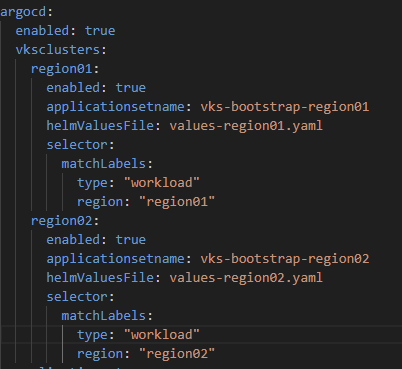
As declared by the vks-mgmt-bootstrap Helm values file, each regional VKS cluster Helm chart has its own values file. This allows granular customisation for each region. By way of example, here is the AKO folder with each value file.
Below is the vks-mgmt-bootstrap Helm values file.
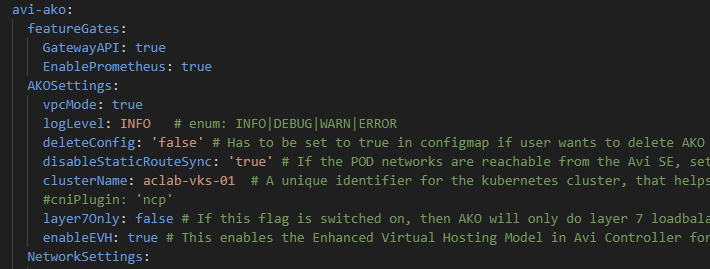
The main difference from the normal AKO value files is that the root key is now avi-ako, which must align to the subchart dependency name key, in the Chart.yaml file.
Whether platform or front-end app, every Helm chart now follows the same pattern. If we want to add another one, all we need to do is add a fresh Helm chart in a new folder within the relevant GitHub path, along with the regional values files.
Once the changes are pushed to GitHub, ArgoCD will automatically pull the changes from GitHub and swiftly deploy the Helm chart into the VKS regional clusters.
First Time Regional VKS Cluster Bootstrap
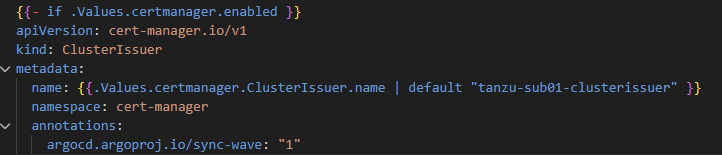
We can now sit back and let ArgoCD automatically deploy each Helm chart. Using an annotation, we have placed the ClusterIssuer for Certificate Manager in Wave 1; this means it will deploy after the rest of Certificate Manager completes. All other objects are currently in the default Wave 0.
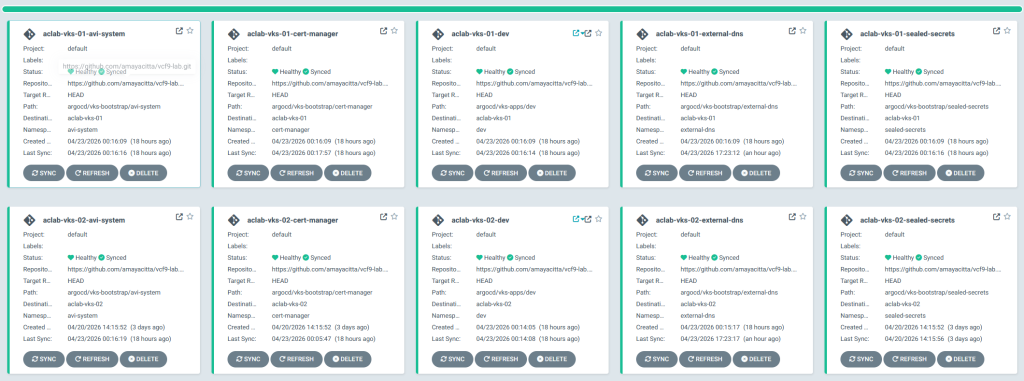
As we pre-loaded the secrets for Certificate Manager, External DNS and AVI AKO, all components will be deployed OK across both clusters.
Creating and backing up Sealed Secrets
We are now going to retroactively convert the deployed secrets into Sealed Secrets. Once done, we can store them in GitHub. We will also back up the keys of the Sealed Secret controller, which can be restored to a new cluster if needed.
There are basic bash scripts stored in GitHub here. The first one will extract the secrets from the cluster and store them in a SealedSecret inside the Argo VKS bootstrap ApplicationSet GitHub path. The commands are run from within the sealed-secrets folder in the root of the repo.
## created sealed secrets for both regional vks clusters
./deploysealedsecrets.sh region01
./deploysealedsecrets.sh region02

## backup sealed secret controllers keys in both regional vks clusters
./backupkeys.sh region01
./backupkeys.sh region02
Here is an example for the region01 vks cluster.
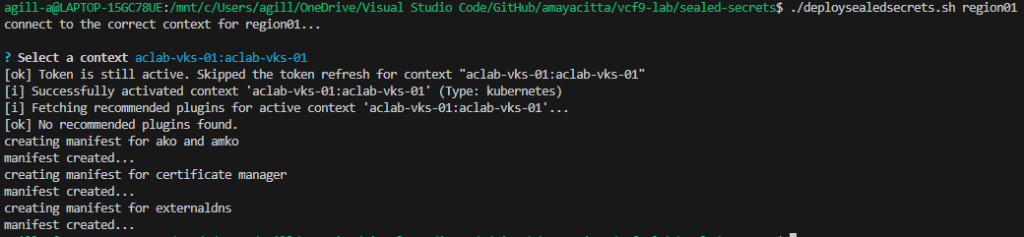

Once this is done, as only the Sealed Secret controller can decrypt the files, we can push the changes to the public GitHub repository. After doing this, the secrets will be managed by the sealed secret controller.
git add . && git commit -m "added sealed secrets" && git pushRedeployment of Regional VKS Cluster Bootstrap
To demonstrate a full re-deployment, we will clear the Application Sets from the management cluster and manually purge all added namespaces, as well as the sealed secret private key from VKS clusters. At this point, we have a fresh cluster.
## switch to the management cluster
vcf context use aclab-vks-mgmt:aclab-vks-mgmt

## delete all appsets
k delete appset -A --all

## switch to one of the regional clusters and delete everything added
vcf context use aclab-vks-01:aclab-vks-01
k delete ns avi-system cert-manager external-dns sealed-secrets dev
k delete secret -l sealedsecrets.bitnami.com/sealed-secrets-key -n kube-system
Now we can restore the Sealed Secret private key and redeploy.
## add bash variables
region=region01
publickey=$(cat tanzu-sub01-public.cer | base64 -w0)
privatekey=$(cat tanzu-sub01-private.pem | base64 -w0)

## restore the private key for Sealed Secrets and confirm
k create -f ../sealed-secrets-backup/vks-$region-main.key
k get secret -n kube-system -l sealedsecrets.bitnami.com/sealed-secrets-key

## switch to the management cluster and deploy the vks-management-bootstrap helm chart
vcf context use aclab-vks-mgmt:aclab-vks-mgmt
helm upgrade --install vks-bootstrap . -n bootstrap --create-namespace --version 0.1.0 --set certmanager.ClusterIssuer.publickey=$public
key,certmanager.ClusterIssuer.privatekey=$privatekey
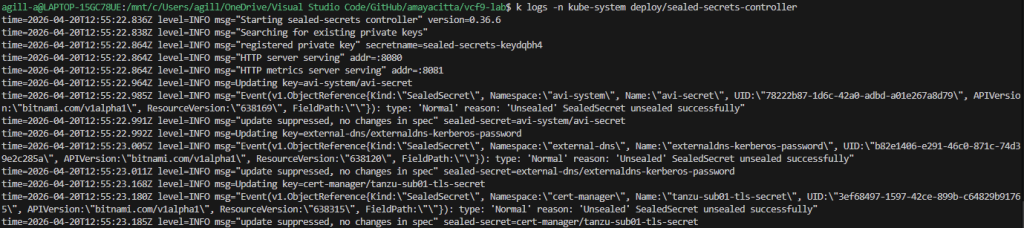
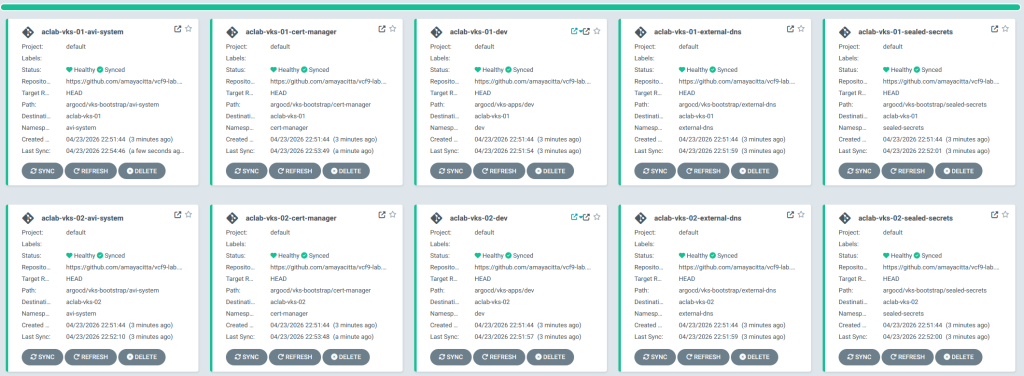
Given a minute or two, redeployment completes. Sealed Secrets are automatically unsealed, and the Sealed Secrets controller creates the required secrets.
Application Deployment
Because we deployed the vks-apps application sets in the management cluster, everything has been automatically deployed.

I’ll take some time to unpack what has been deployed and how it works, then we can start breaking things and seeing how GSLB handles regional failures, etc.
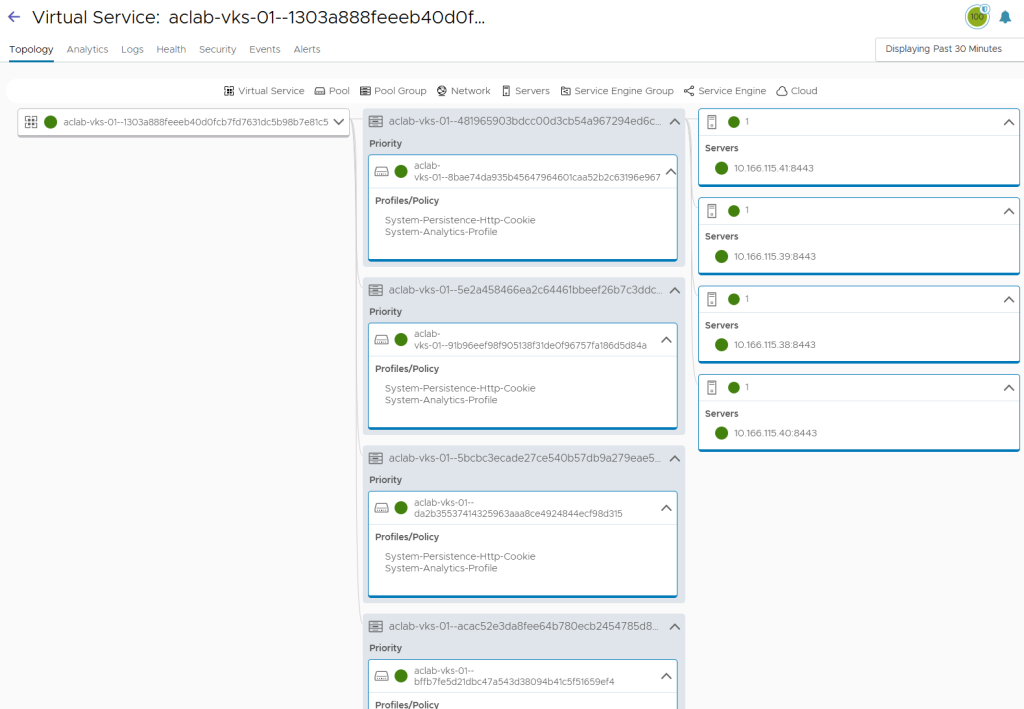
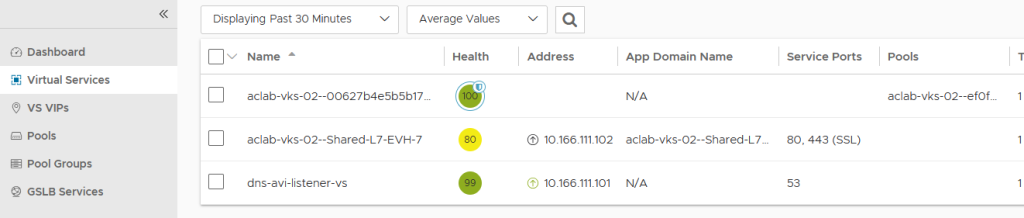
There is a shared L7 virtual server region 01.

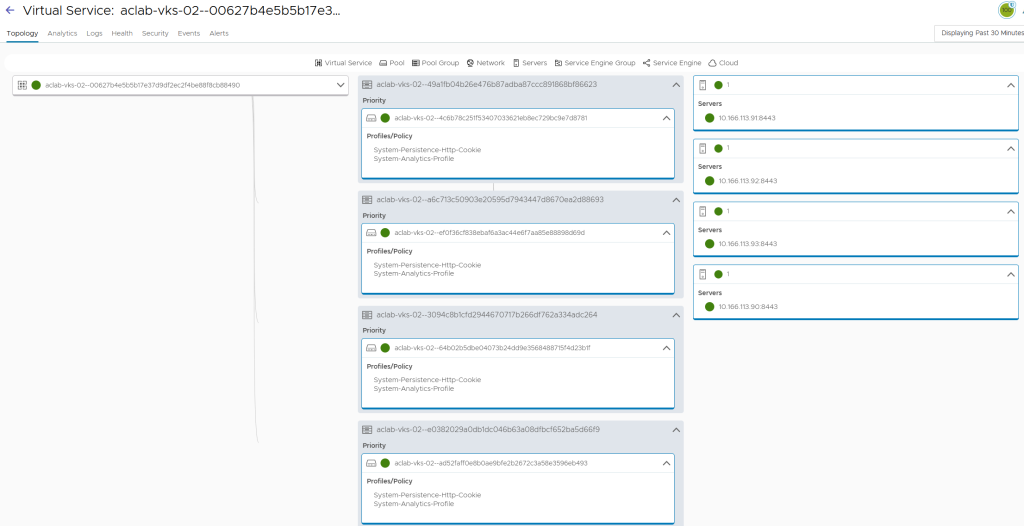
With a child VS for the routable pods.
There is a shared L7 virtual server region 02.
With a child VS for the routable pods.
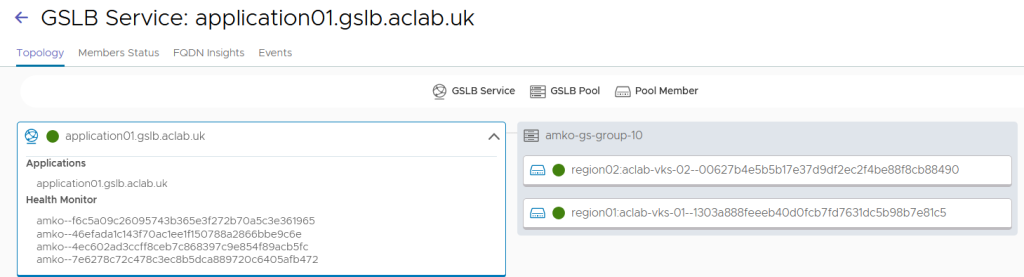
From GSLB services, we can see our global address for the application.

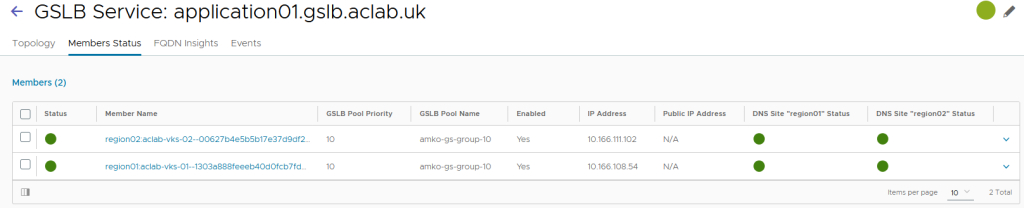
This is correctly attached to both regions.
A CNAME alias has been automatically created by ExternalDNS, securely on my Microsoft Active Directory DNS zone. This can be checked by running the following script. Kudos to jhasensio for this one. I took his script and modified it slightly for my needs.
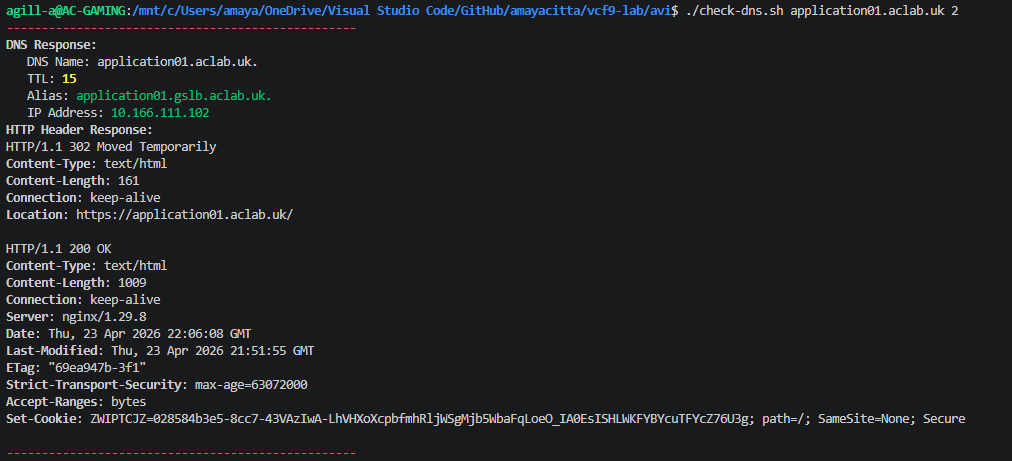
The resolution matches region 02.

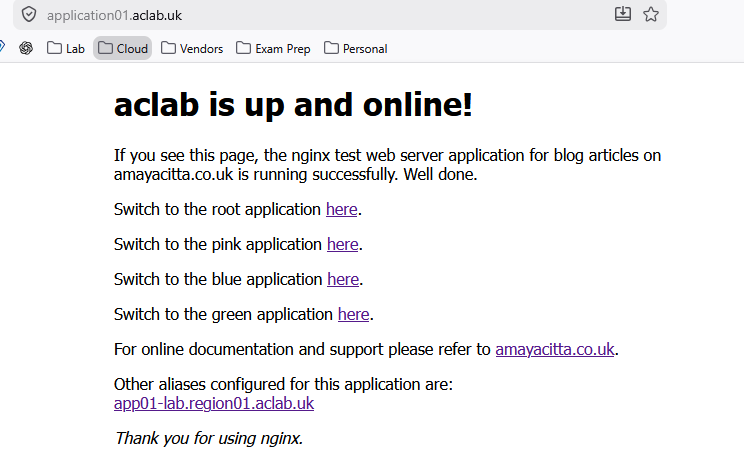
If I hit the URL in my browser, all looks good.
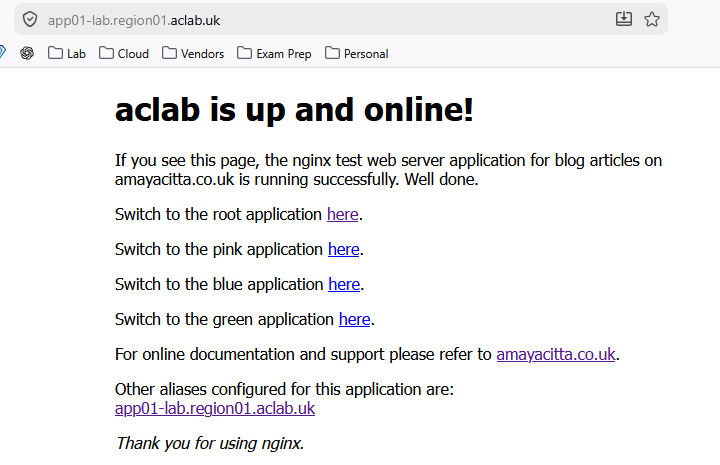
Because the application uses regional aliases, I can also hit the app locally. This is useful for diagnostics.
By default, the GSLB load-balancing algorithm is round-robin, with no site persistence and basic HTTPS health checks only. All of these are configurable within the sub-chart values files here.
For example, we can play with traffic splitting. Maybe you need to do a canary deployment. Meaning you want to send a small proportion of traffic for a new application build to a single region where the new iteration of the application resides. This allows more controlled rollouts of production releases.
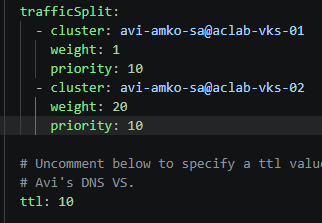
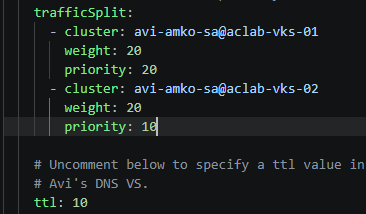
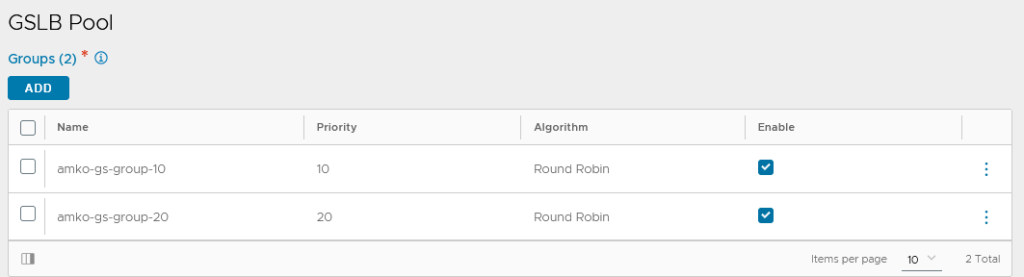
The use of the priority flag enables certain clusters to be excluded. If two clusters are given a priority of 20 and a third cluster is added with a priority of 10, the third cluster will not route any traffic unless both cluster1 and cluster2 (with priority 20) are down. This allows an active/passive type setup. I will use this method as a test, essentially disabling region 02 unless region 01 fails. The following values are set and pushed so ArgoCD can re-configure AMKO.
Within 30 seconds, the GSLB service updates.

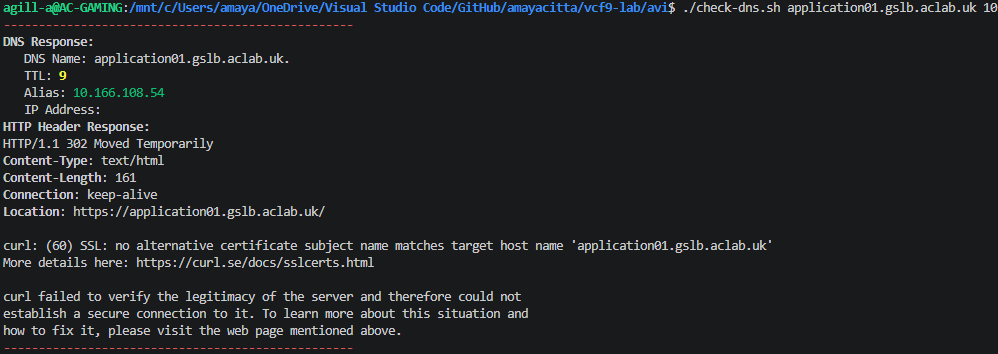
If I re-run the DNS check but directly to the GSLB address, the TTL has updated.
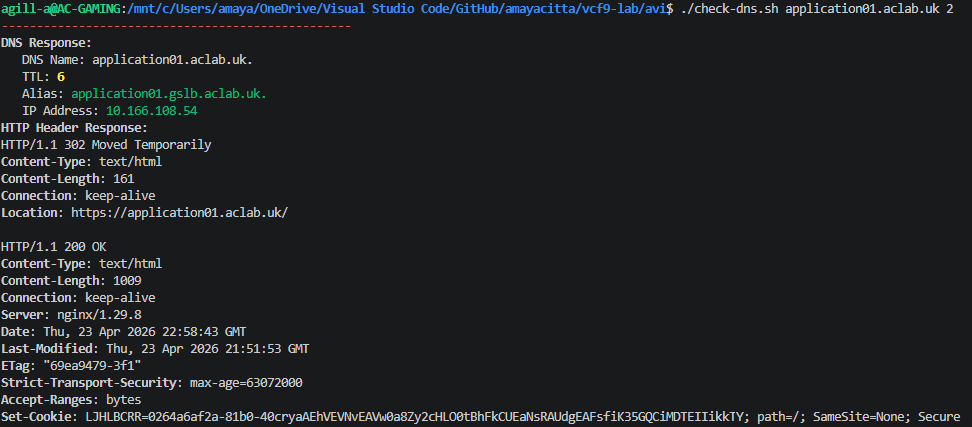
However, as I’m using a CNAME alias which is created with ExternalDNS, this will also need updating in the application values file.

Another commit and push, and on the next sync cycle from ExternalDNS, we get the correct TTL. The response will always be 10.166.108.54, as this is the prioritised region.
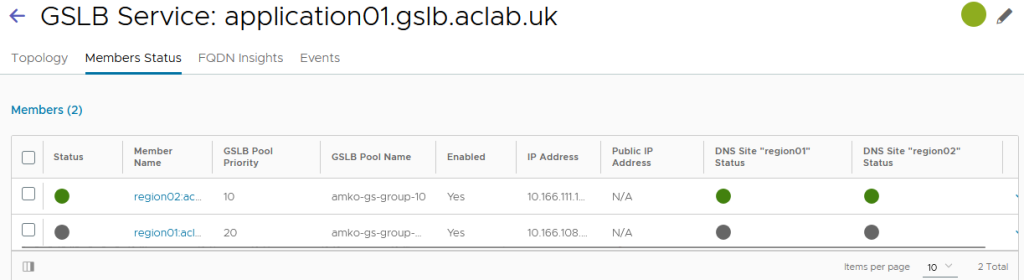
If I go into region 01 and disable the child VS

The primary region fails, and DNS resolution flips to the surviving region.
Change the Leader
Assuming we have completely lost region 01, to change the leader, we can carry out the following tasks. In the lab, I have simply shut down the AVI control plane in region 01. Service engines will continue to work, but the configuration is static. From the region 02 control plane, run the following commands over SSH.
shell
show cluster | grep cluster
gslb changeleader new_leader <clusteruuid>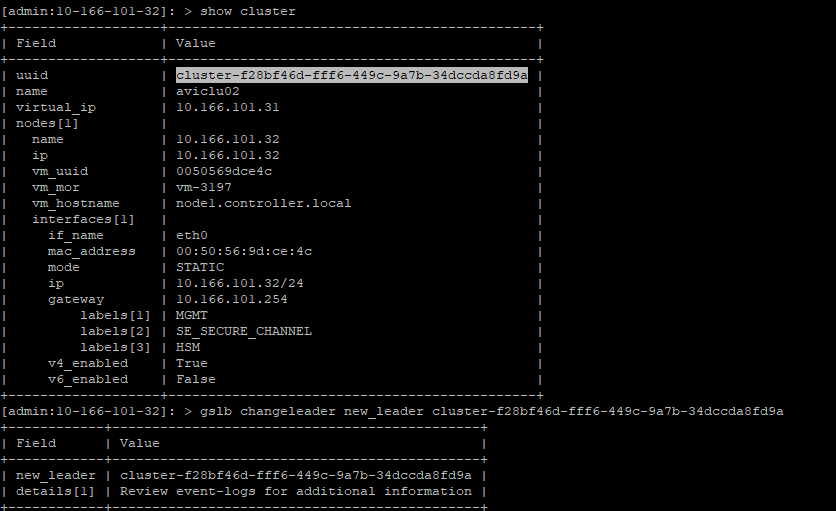
Lastly, we need to flip the flags in the Helm values files. Setting region 02 to the leader and region 01 to the follower. Again, we commit and push to apply.
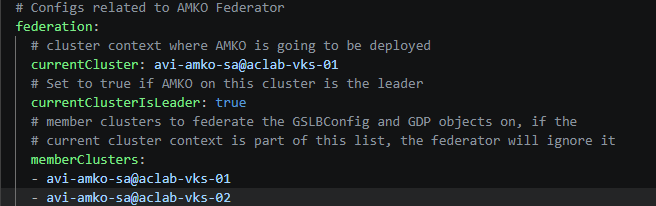
The leader has now changed, and changes are possible via region 02. This aligns with the AMKO pod running inside the VKS cluster.

Make the prior leader a follower
To bring region 01 back, we must assume that the configuration has changed in region 02, and we need to make region 01 a follower. We do not want it to attempt to write its configuration; dual leaders are not supported and can cause chaos.
On the new leader (region 02), we run the following commands to capture the view_id and cluster UUID.
show gslb Default | grep -i view
show cluster | grep cluster
We need to boot the prior leader and then use the captured information to tell the old leader it must become a follower.
shell
gslb changeleader new_leader <clusteruuid> view_id <view-id>
Due to the time it takes to boot the node, log in and complete the commands, the documentation cites the following issues.
- There might be configuration synchronisation issues between the two sites if the leader is changed manually.
- There will be a disruption in traffic while doing these changes, as changing the leader site will initiate the configuration synchronisation from the new leader site to the old leader site.
- DNS records can also have inconsistencies, as the new leader might synchronise fewer records to the previous leader’s site (the new follower).
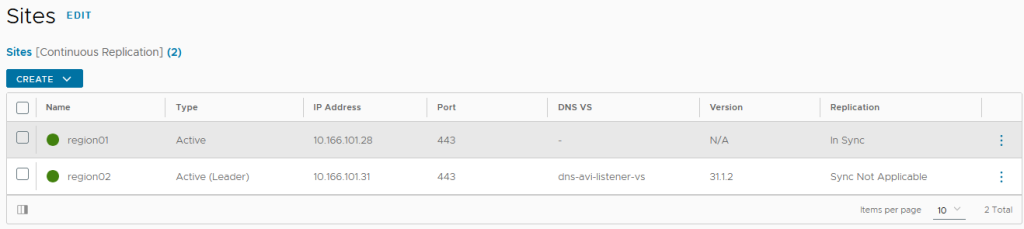
We have now inverted the leader. Region 02 is the leader, and Region 01 is the follower.
Final Topology
Here is the topology diagram revisited, hopefully now the design maps together in an understandable way.
Conclusion
This article shows how ArgoCD can empower you to bootstrap and continuously develop your vSphere Kubernetes Platform with GitOps principles.
There are many iterations and improvements I can think to add. They will have to come later in other articles. Given that OpenShift has also chosen ArgoCD for its GitOps integration, the learning here will definitely cross over. I look forward to flattening my lab and starting a one-node bare metal OCP cluster, bootstrapped and maintained by ArgoCD.
GSLB from VMware AVI has proven to be resilient and easy to configure. The integration into Kubernetes and your GitOps methods is solid. We managed to get CNAME aliasing working well; this is pretty standard for commercial deployments with my customers.
I look forward to developing the clusters. As I do that, I will keep committing progress to the GitHub repository.
