I thought I would write a quick post on the setup of the VCF tool for supervisors and VKS clusters. The setup is quite different and was confusing at first. I hope this helps others in their initial configuration and understanding of how it works.
Navigation
The old way with 9.0.X
For comparison, here is what we did with the 9.0.X version. Plugins were automatically downloaded from the Broadcom website with no additional user intervention. Note at the time I was doing this with WSL Linux.
## extract and install cli tools
tar -xvzf vcf-cli.tar.gz
sudo mv vcf-cli-linux_amd64 /usr/local/bin/vcf
rm vcf-cli.tar.gz
curl -LO "https://dl.k8s.io/release/$(curl -L -s https://dl.k8s.io/release/stable.txt)/bin/linux/amd64/kubectl"
sudo mv kubectl /usr/local/bin/

## confirm cli install
vcf version
kubectl version

## sort auto complete and 'k' alias for kubectl
sudo dnf install bash-completion -y
vcf completion bash > $HOME/.config/vcf/completion.bash.inc
printf "\n# VCF shell completion\nsource '$HOME/.config/vcf/completion.bash.inc'\n" >> $HOME/.bashrc
kubectl completion bash | sudo tee /etc/bash_completion.d/kubectl > /dev/null
sudo chmod a+r /etc/bash_completion.d/kubectl
echo 'alias k=kubectl' >>~/.bashrc
echo 'complete -o default -F __start_kubectl k' >>~/.bashrc
source ~/.bashrc
The new way with 9.1
Plugins are no longer installed automatically, we must manually grab them from the Broadcom download page. If we head to the VCF Downloads and then go to version 9.1.0.0 > VCF Consumption CLI. In my case I’m now on MacOS, so need to download Darwin_ARM64. Download the flavour relevant to you.

Go back to the list and also click on VCF Consumption CLI Plugins, again download the flavour relevant to yourself.

We can now run the following for easy setup.
## extract and install cli tools and tidy up
mkdir vcf-plugins
tar -xvzf VCF-Consumption-CLI-Darwin_ARM64-9.1.0.0.25296329.tar.gz
tar -xvzf VCF-Consumption-CLI-PluginBundle-Darwin_ARM64-9.1.0.0.25305443.tar.gz -C vcf-plugins
rm VCF-Consumption-CLI-*

## copy the vcf binary to somewhere included in your default $PATH
cp vcf-cli-darwin_arm64 ../Documents/utils/vcf
chmod +x ../Documents/utils/vcf

## confirm cli install
vcf version

## sort auto complete
brew install zsh-autocomplete
vcf completion zsh > $HOME/.config/vcf/completion.zsh.inc
printf "\n# VCF shell completion\nsource '$HOME/.config/vcf/completion.zsh.inc'\n" >> $HOME/.zshrc
source ~/.zshrc

## install plugins and confirm
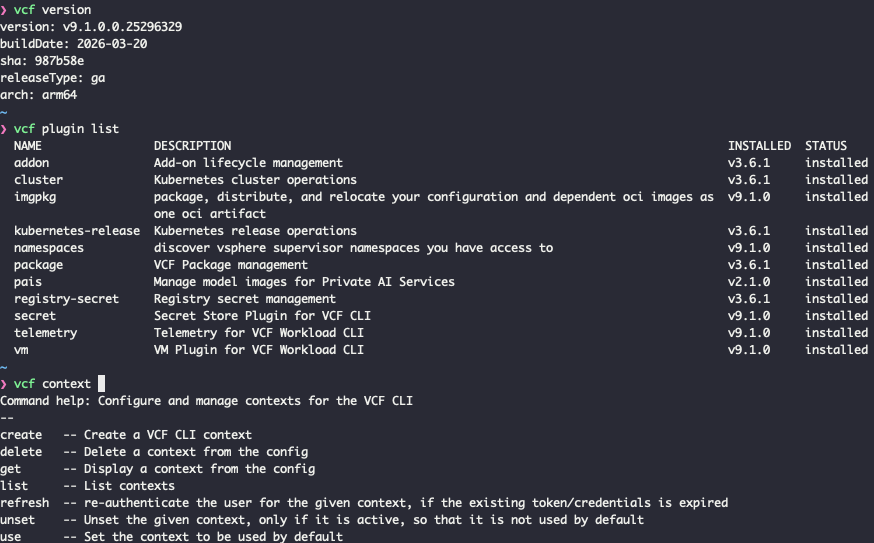
vcf plugin install all --local-source vcf-plugins
vcf plugin list
Once complete, VCF will is setup and you’re ready to start to create contexts and connect to clusters.