
Virtual Private Networking (VPC) has been around since VCF 5.2.1. The latest 9.0 release brings additional features such as transit gateways, consumption via vSphere, VCF automation integration, Tanzu supervisor support, VPC ready workload domains and DHCP enhancements.
For the setup of VPC networking via vSphere, please refer to the NSX networking section of the VCF9 Lab article. The rest of this article unpacks the main networking options for VPC networking.
Navigation
- Introduction
- Subnet Types
- IP Blocks
- Private VPC Plumbing
- Private Transit Gateway Plumbing
- Public Subnet Plumbing
- Gateway Connectivity
- External IPs
- What’s Next?
Introduction
VPC is a cloud-like experience for the VCF SDDC, with the ability to provision NSX networking from vSphere, without needing to ever log in to NSX manager. You configure a lot of the plumbing directly from vCenter. There are some exceptions, like DHCP or north/south firewall.

There are two principal pathways; centralised connectivity, which is more akin to classic NSX, where you have edge clusters which usually peer with the external network using, for example, BGP. Centralised has a full feature set and should be used where possible. This article is only going to explore centralised connectivity.
There is also distributed connectivity in which no edges are used at all. Instead, a transit gateway maps straight onto a VLAN that all ESX hosts share. You configure static routing via an external router or L3 switch to get in and out. Distributed does not support features such as NAT, north/south firewall, NSX Load balancing for Tanzu Supervisors, or the AVI load balancer plugin.
Subnet Types
There are three subnet types for creation within each VPC. Each VPC resides in an NSX project which shares a single common default transit gateway. To create separate transit gateways, additional NSX projects are required. Each NSX project is effectively a new tenancy and requires its own unique centralised or distributed connectivity.
Below outlines the subnet types and how they are plumbed.
| Subnet Type | Plumbing |
| Private VPC | Reachable from inside the VPC only. |
| Private Transit Gateway | Reachable from inside the same and other VPC networks but not advertised outside NSX. These subnets are attached to a shared transit gateway which is common across a given NSX project. |
| Public | Fully routable subnet which is advertised outside NSX, to your wider network. |
IP Blocks
Each subnet is allocated a pre-defined subnet size, which you select, that carves a CIDR from one of three IP blocks.
| IP Block | Allocated from subnet type | Configured on |
| Private VPC IP CIDRs | Private VPC Subnets | VPC |
| Private Transit Gateway IP Blocks | Private Transit Gateway Subnets | VPC connectivity profile in NSX or the VC > Networks > Network connectivity page in vSphere. |
| VPC External IP Blocks | Public Subnets Additionally, External IP’s. These are assigned to virtual machines that are attached to Private VPC or Private Transit Gateway subnets. External IP’s configure automatic NAT rules to give external connectivity to VMs attached to these otherwise internal only subnets. | VPC connectivity profile in NSX or the VC > Networks > Network connectivity page in vSphere. |
You configure IP blocks within vSphere. The Private Transit Gateway IP Blocks and VPC External IP Blocks are both configured here.

Private VPC IP CIDRs are configured when you add the VPC itself; they can also be added retrospectively. Multiple CIDRs are permitted.

Each ultimately becomes an IP address block in NSX, so addresses can be automatically allocated.

The network topology section of NSX Manager does a decent job of drawing everything out. Below is an example of my lab “vpc-infra” VPC. This has T0 connectivity to my MikroTik router on the outside, which is connected using ECMP with four paths, 2 per edge node. As part of this article, we will explore each subnet type and see the behaviour.

Private VPC Plumbing
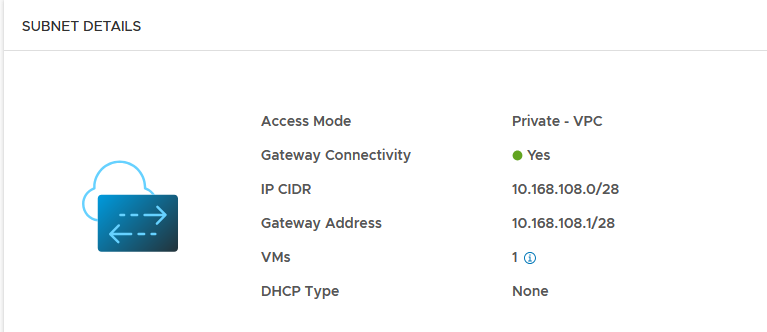
When adding a private subnet, it gets its own VNI and segment. The CIDR allocated comes from the Private VPC IP CIDRs IP Pool. Which in this NSX project is 10.168.108.0/24. A subnet size of 16 was selected, which has correctly allocated a /28 subnet 10.168.108.0/28. The first address is always reserved for the default gateway, which is allocated to the local VPC gateway VRF on the edge cluster.

Like all segments, this has a MAC address table for anything connected. This gets synced with the central control plane (NSX Managers) and local control plane (Transport Nodes) within the same transport zone. The NSX system then knows which VTEP to reach in order to get to the desired destination. All of this is automatically managed by NSX, GENEVE encapsulation and de-encapsulation generally “just works”. I’ve not seen many issues with it in the field, beyond improper MTU configuration on the underlay (1700 or Jumbo).


The allocated CIDR is automatically plumbed into the local VPC Gateway VRF (SR and DR). Routing between subnets within the local VPC will take the following path:
VM > Local VPC Gateway > VM

However, the private subnet does not propagate to the transit gateway, beyond to the tier-0 gateway or to my external router. Hence, it is not usable outside the construction of the local VPC itself.

From a virtual machine in the private subnet, I can reach the default gateway and another subnet in the same VPC. But any attempt to go outside the VPC is not possible. This is expected behaviour and is how a private subnet should behave.
Below shows the routing table and then a ping to the default gateway, another VM is on another subnet inside the same VPC and then the internet.

Private Transit Gateway Plumbing
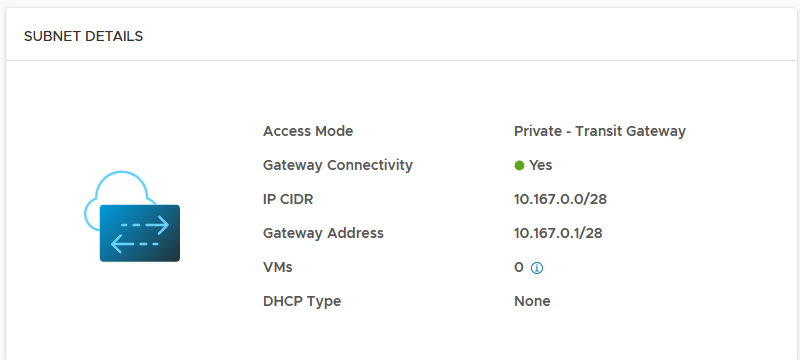
When adding a private transit gateway subnet, it gets its own VNI and segment. The CIDR is allocated from the Private Transit Gateway IP Blocks. Which, in this NSX project, is 10.167.0.0/16. A subnet size of 16 was selected, which has correctly allocated a /28 subnet 10.167.0.0/28. The first address is always reserved for the default gateway, which is allocated to the local VPC gateway VRF on the edge cluster.

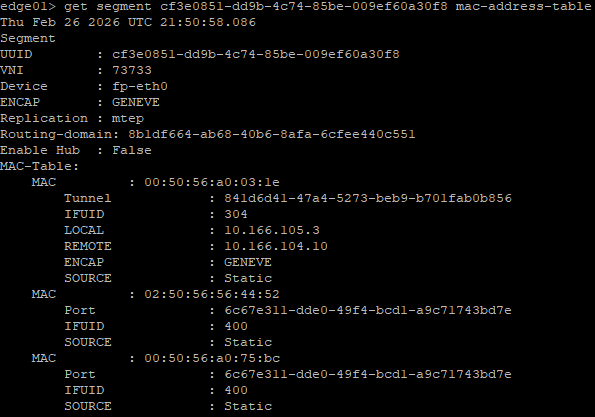
Like all segments, this has a MAC address table for anything connected. This gets synced with the central control plane (NSX Managers) and local control plane (Transport Nodes) within the same transport zone. The NSX system then knows which VTEP to reach in order to get to the desired destination. All of this is automatically managed by NSX, GENEVE encapsulation and de-encapsulation generally “just works”. I’ve not seen many issues with it in the field, beyond improper MTU configuration on the underlay (1700 or Jumbo).

The allocated CIDR is automatically plumbed into the local VPC Gateway VRF (SR and DR). Routing between subnets within the local VPC will take the following path:
VM > Local VPC Gateway > VM

As this is a private transit gateway subnet, the subnet will also be advertised to the default transit gateway, but not the tier-0 gateway or my external router. This means that inter-VPC traffic will take the following path.
VM > Local VPC Gateway > Default Transit Gateway > Remote VPC Gateway > VM.


From a virtual machine in the private transit gateway subnet, I can reach the local VPC default gateway, another subnet in the same or different VPC. But any attempt to go outside NSX is not possible. This is expected behaviour and is how a private transit gateway subnet should behave.
Below shows the routing table, a ping to the default gateway, another VM is another subnet inside the same VPC, another VM in a different VPC and then the internet.

Public Subnet Plumbing
When adding a public subnet, it gets its own VNI and segment. The CIDR is allocated from the VPC External IP Blocks IP Pool. Which, in this NSX project, is 10.166.108.64/26. A subnet size of 64 was selected, which has correctly allocated a /26 subnet 10.166.108.64/26. The first address is always reserved for the default gateway, which is allocated to the local VPC gateway VRF on the edge cluster.


Like all segments, this has a MAC address table for anything connected. This gets synced with the central control plane (NSX Managers) and local control plane (Transport Nodes) within the same transport zone. The NSX system then knows which VTEP to reach in order to get to the desired destination. All of this is automatically managed by NSX, GENEVE encapsulation and de-encapsulation generally “just works”. I’ve not seen many issues with it in the field, beyond improper MTU configuration on the underlay (1700 or Jumbo).


The allocated CIDR is automatically plumbed into the local VPC Gateway VRF (SR and DR). Routing between subnets within the local VPC will take the following path:
VM > Local VPC Gateway > VM

As this is a public subnet, it will also be advertised to the default transit gateway, the tier-0 gateway and my external router.
Inter-VPC traffic will take the following path.
VM > Local VPC Gateway > Default Transit Gateway > Remote VPC Gateway > VM. In the example below, 10.167.0.16/28 is a private transit gateway subnet in another VPC in the same NSX project.

From a virtual machine in the public subnet, I can reach anything but private subnets in remote VPCs.
Below shows the routing table, a ping to the default gateway, another VM in another subnet inside the same VPC, another VM in a different VPC and then the internet.

From the edge cluster local VPC VRF, you can see other public subnets attached to the same VPC. These have full interconnectivity with each other without having to leave the boundary of the VPC.

From the router on the outside we see this subnet being advertised.

The data path to the internet from a virtual machine in the “servers” public subnet would be as follows.
VM > VPC Gateway > Default Transit Gateway > Tier-0 Gateway > MikroTik Router.
Here is a topology diagram from NSX mapping out the above scenarios.

Gateway Connectivity
Additionally, gateway connectivity can be selectively enabled or disabled for each of the three subnet types. Disabling will disconnect the subnet from the VPC gateway, which is the default gateway of your subnet.
Note that the server subnet in this VPC has auto-allocation disabled. I had to do this because I redeployed and wanted to re-attach my virtual machines without having to change all the static IP addresses on the virtual machines.
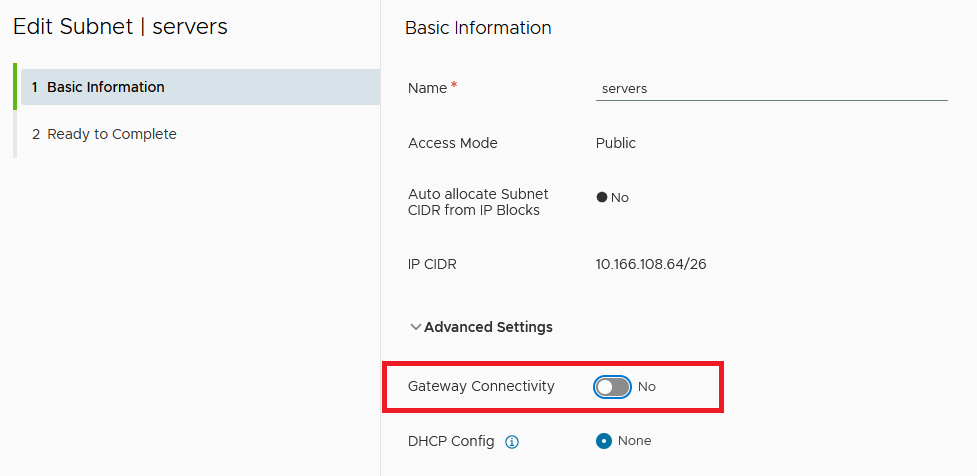
Once you disconnect gateway connectivity, any traffic which is trying to reach other VPCs or the internet via the default transit gateway and/or tier-0 gateway will be dropped.
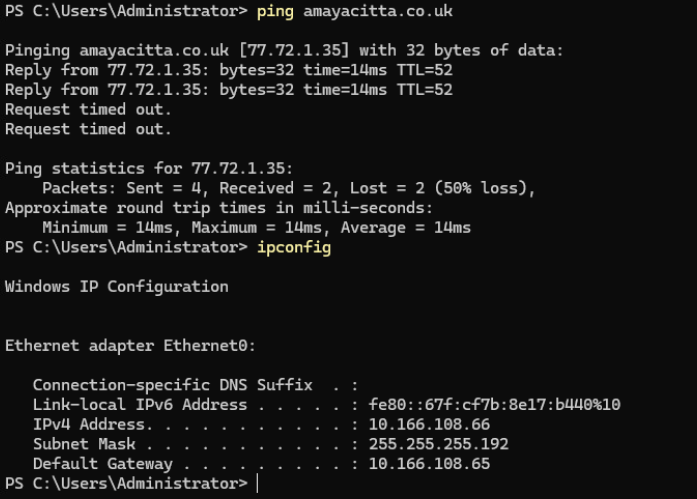
You could think of this as a step further along than the private VPC, as you won’t even be able to connect internally between subnets in the same VPC. You will, however, be able to communicate with systems inside the same subnet.
I think of it as running a GENEVE flat layer 2 network inside the VPC, which could be helpful for private peering/clustering/replication type networks.
External IPs
External IP’s are automatically allocated per virtual machine from the VPC External IP Block. They can only be used with private or private transit gateway subnets. Once added, the /32 address will be advertised to the local VPC Gateway, Transit Gateway and Tier-0 Gateway. Additionally, Source and Destination NAT will be automatically configured for the virtual machine.
To assign one, find a virtual machine in a private or private transit gateway subnet > right click > assign an external IP.

Select the network adaptor and click OK.

From the edge node CLI, you can see the NAT configuration, which is now translating from the inside address of 10.167.108.2 to an outside address of 10.166.108.0.

The 10.166.108.0/32 address is advertised on the VPC gateway, transit gateway and the tier-0 gateway.

Which is also advertised to my external router, meaning I can reach it from the network outside NSX.

If you look at the firewall address sets and rule sets on one of the edge nodes, you can see more detail. The first command will show all interfaces, look for the ID of the service router for the default transit gateway.
get firewall interfaces
get firewall b4fd8bd2-6c27-4a3f-b42e-85af37eecc1c connection
get firewall b4fd8bd2-6c27-4a3f-b42e-85af37eecc1c addrset sets
get firewall b4fd8bd2-6c27-4a3f-b42e-85af37eecc1c ruleset rules
Here you can see the DNAT, SNAT and address objects. They do not show in NSX Manager.

What’s Next?
This sums up NSX VPC networking. Next, I will configure Tanzu backed by VPC subnets. After that, I’ll do an article on NSX classic networking, with Tanzu thrown in for good measure. Following that, I’ll begin the journey unpacking the rest of the VCF components, such as Operations, Automation, etc.
